Mind your business.
We’ll mind the expenses.

Receipt-chasing is a death by a thousand papercuts. Kill the admin before it kills your momentum. Automate the boring admin so you can get back to the only thing that matters: winning.
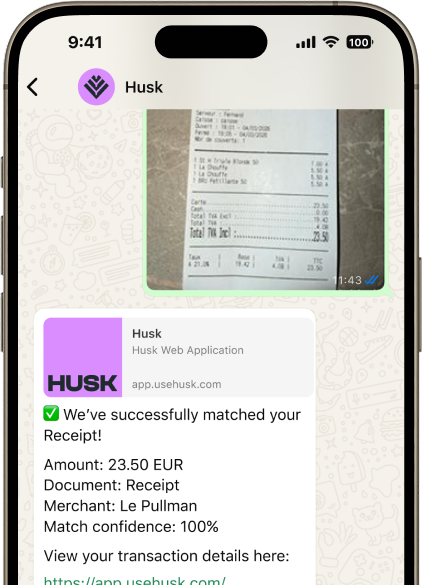
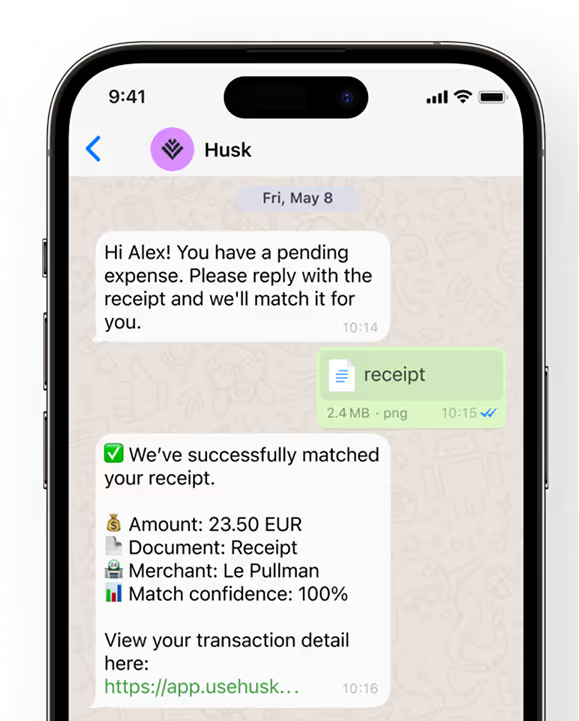
Husk receipt matching shown on a phone
Travel ticket
-€140.00
SaaS
-€100.50
Ads
-€15.00
-70% time spent on manual finance tasks.
+80% employee receipt matching.
2 FTE workdays reclaimed.
+16 hrs/month reclaimed.
12x faster 
invoice processing.
WhatsApp integration.
From chaos
Invoice€50.00

Receipt is Late

Invoice€20.00

Receipt is Late

Invoice€125.00

Receipt Request

Invoice€80.00

Receipt Request

Invoice€500.00

Receipt Request

Invoice€200.00

Receipt Request

Invoice€500.00

Receipt Request

Invoice€280.00

Receipt Request

Invoice€50.00

Missing Receipt

Invoice€140.00

Receipt is Late

Invoice€400.00

Missing Receipt

Still waiting on 3 missing receipt
Did you submit yet???
Where are your Q2 expenses?
I’m waiting the receipt from you
Can you resent the receipt???
To peace
Husk has streamlined our spending at Spotable with virtual cards for vendors and corporate cards for every team member, fully under control in the dashboard. Real-time tracking and built-in credit ensure smooth cash flow management for our growing business.
Sebastien Vandendriessche
Сo-founder, Spotable
Expense control for founders with better things to do.
Husk kills the manual entry before it kills your Sundays. Our platform automatically hunts down receipts, categorizes every euro, and syncs directly to your accounting in real-time.
0 manual 

expense reporting.
Multiply output, not headcount. Husk eliminates the need for an administrative hire, doing the work of a full-time assistant in the background.
Get started for free
Your entire finance department in a WhatsApp chat thread.
Every company transaction needs a receipt. With our WhatsApp integration, sending receipts is as easy as sending pictures to your friends. Just snap it with WhatsApp, and we'll match it to the right transaction for you.
Get started for free
Software & Subscription
5 Apr
-180€
Closed
IT infrastructure
AI tools
Automatic reconciliation.
Stop playing detective. Husk instantly pairs every swipe with its receipt and categorizes the spend, so your books are audit-ready before you even close your laptop.
Get started for free
Inflow
Ouflow

Expense Breakdown - March 2026

Total 12,987

Burn rate €1,121 / month 3 month average

Net Gross
86.6% vs previous month
Real-time expense reporting.
No more month-end surprises. Access a live heartbeat of your company’s spend and runway, allowing you to make high-velocity decisions based on today’s data, not last month’s statements.
Get started for free
Invoice 387 €140.00
Going from submitted...
Matching...
Matched
Process invoices
12 times faster.
Husk automatically reads and processes invoices in 107+ languages, turning a complex manual task into a 1-click global workflow.
Get started for free
Get started for free.
Experience how Husk can transform your financial workflows from day one.
Sign up

Frequently asked questions.

Quick answers to questions you may have
Which transactions can I see on the platform?
All users can view their own card transactions, while admins have full visibility of all members' transactions through their dashboard. Premium subscribers gain additional access to transactions from their connected bank accounts. Husk brings everything together in one platform, making financial management simpler.
Can I manage my expenses?
Yes. With Husk, you can easily link expenses to their corresponding transactions. Simply open the app, select the transaction, and add your expense details. You can include a description and attach receipts or invoices. All this information can be exported later for accounting purposes, making employee expense management much simpler.
Can I export all my transactions?
Yes, you can export all your card transactions as a CSV file. You can also include any receipts and invoices you've uploaded to the platform.
What should I do if a transaction gets declined?
If your transaction is declined, try submitting it again, as this often resolves the issue. Check your card settings and limits in the app and adjust them if necessary to allow the transaction. If the transaction is still declined, verify that: the card isn't blocked, you haven't reached your maximum credit limit, and you're passing the 3D Secure authentication checks.